 Turkey (Türkçe)
 Worldwide (English)
Live resource and traffic monitoring
Monitor CPU, RAM, disk and network usage from the client panel. Review server status and core resource metrics without installing a separate monitoring tool.
Turkey location, KVM virtualization and FiberVM control
Review each plan for current virtualization, access and provisioning details.
| # | Model |  CPU CPU |
 RAM RAM |
 Disk Disk |
 Bandwidth Bandwidth |
 RAID RAID |
 Location Location |
 Price Price |
|
|---|---|---|---|---|---|---|---|---|---|
| 0 |
SSD VPS/VDS1 |
1vCPU E5-2683 v3 | 1GB | 25GB SSD | 1G/Sınırsız | Raid 50 | - |
$3 (Monthly) |
Buy |
| 1 |
SSD VPS/VDS2 |
2vCPU E5-2683 v3 | 2GB | 35GB SSD | 1G/Sınırsız | Raid 50 | - |
$4 (Monthly) |
Buy |
| 2 |
SSD VPS/VDS3 |
4vCPU E5-2683 v3 | 4GB | 50GB SSD | 1G/Sınırsız | Raid 50 | - |
$6 (Monthly) |
Buy |
| 3 |
SSD VPS/VDS4 |
5vCPU E5-2683 v3 | 5GB | 75GB SSD | 1G/Sınırsız | Raid 50 | - |
$9 (Monthly) |
Buy |
| 4 |
SSD VPS/VDS5 |
6vCPU E5-2683 v3 | 6GB | 100GB SSD | 1G/Sınırsız | Raid 50 | - |
$12 (Monthly) |
Buy |
| 5 |
SSD VPS/VDS6 |
8vCPU E5-2683 v3 | 8GB | 125GB SSD | 1G/Sınırsız | Raid 50 | - |
$17 (Monthly) |
Buy |
| 6 |
SSD VPS/VDS7 |
6vCPU E5-2683 v3 | 10GB | 175GB SSD | 1G/Sınırsız | Raid 50 | - |
$21 (Monthly) |
Buy |
| 7 |
SSD VPS/VDS8 |
8vCPU E5-2683 v3 | 12GB | 200GB SSD | 1G/Sınırsız | Raid 50 | - |
$25 (Monthly) |
Buy |
| 8 |
SSD VPS/VDS9 |
10vCPU E5-2683 v3 | 14GB | 225GB SSD | 1G/Sınırsız | Raid 50 | - |
$30 (Monthly) |
Buy |
Managing a FiberServer Turkey VDS is not limited to SSH or Remote Desktop. The FiberVM client panel brings power operations, live resource monitoring, a browser-based VNC console, snapshots, reinstallation, password and network settings together in one place.
Monitor CPU, RAM, disk and network usage from the client panel. Review server status and core resource metrics without installing a separate monitoring tool.
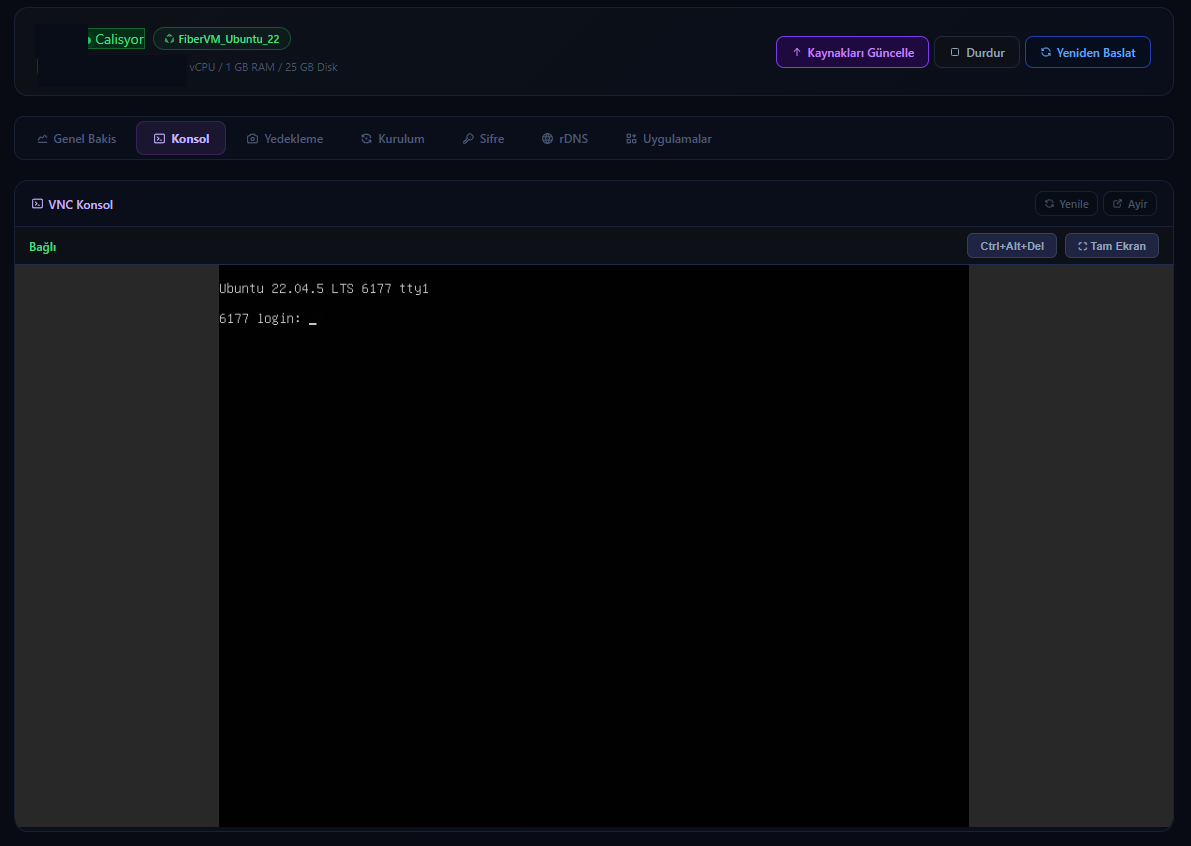
Open the console in your browser even when SSH or RDP is unavailable. Diagnose network, firewall and operating-system startup issues directly.
Start, stop, reboot or force-stop your virtual server from the panel without opening a support request.
Create a snapshot before risky updates or configuration changes and restore an earlier state where the selected plan supports it.
Start a clean installation using supported Linux and Windows options, then follow provisioning and access details from the same panel.
Manage the server password, configure reverse DNS for the assigned IP address and access supported one-click application installations.

The FiberVM control layer remains available when the operating system of your Turkey-hosted VDS cannot be reached. You can perform the first recovery steps through power controls and console access without waiting for a remote-login service to return.
If an incorrect network setting, firewall rule or remote access service locks you out, the VNC console displays the virtual machine screen directly. You can inspect Linux boot messages or access Windows recovery remotely.
The panel provides self-service server management tools. The FiberServer technical support team can also assist with fault diagnosis and supported configuration processes when required.
Hardware and network capabilities available across the server platform:
Server-class processor options selected according to plan and location.
ECC memory options support data integrity and stable server operation.
Low-latency NVMe storage options for databases, virtual machines and application workloads.
Network routing is designed to support reliable connectivity across available locations.
Network-level filtering helps reduce the impact of common volumetric attacks.
KVM plans provide isolated virtual machines with root or administrator access.
Turkey-hosted VDS plans are designed for websites, business applications, e-commerce platforms and remote teams that need responsive access for users in Turkey. KVM virtualization isolates CPU, RAM and NVMe storage resources from other virtual machines on the host.
Hosting the virtual server in Turkey can reduce dependence on international routes and provide more consistent response times for a primarily Turkish audience. Select a plan by evaluating CPU, memory and storage together with traffic, backup requirements and the location of your users.
Provisioning time depends on the selected plan and stock status. Access details are delivered after setup is complete.
Manage the operating system and supported software according to the access level of the selected service.
Contact the team to review available CPU, memory and storage upgrade paths.
Use snapshots before risky changes where the selected service supports them. Keep independent backups as well.
Ask about compatible commercial or open-source control panel options for your operating system.
Available Linux and Windows options depend on the selected plan and license requirements.